
Many EV Rider episodes are available to watch in 3D spatial video via YouTube VR. Occasional 360-degree videos are also being produced.
EV Rider In 3D Spatial & 360-Degree Video On YouTube VR
If you have a Meta Quest, Apple Vision Pro, Android XR headset or compatible XR glasses, download the YouTube VR app from your device’s app store, then search “EV Rider channel.” At last check YouTube VR didn’t support copy/paste but if you want to give it a try, here’s the EV Rider YouTube VR 3D playlist link.
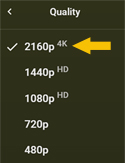
To get the best viewing experience make sure the highest quality setting is selected, which is “2160” or higher and enter immersive mode. EV Rider 3D videos will not display correctly in YouTube VR unless immersive is selected.
If you don’t have a YouTube VR-capable device you can still watch 3D episodes via “regular” YouTube by using inexpensive blue/red 3D glasses. Put the glasses on and select the EV Rider 3D playlist.
Editor’s Note: The above video references Meta Quest TV. EV Rider’s Meta Quest channel was retired when Meta discontinued the service. Most of that content is still available on YouTube VR.